

What’s new in ZePrA 13?
New Features and Improvements in ZePrA 13
- New Flows tool provides new automation options
- New Auto Setup mode to set up Flows
- New options for enhanced Image Quality
– New image scaling options that now allow for upscaling or downscaling of the Image Resolution
– New option for changing the Image Dimension - Create Multicolor SaveInk profiles on-the-fly using SmartLink
- New SmartLink Method for conversion to Multicolor with preservation of CMYK color spaces
- New option to overwrite existing items when importing configurations
- Define spot color conversion via external files
- Expert DeviceLink Set is included in ZePrA 13
- New smaller but great features for more versatility, speed and quality
New Flows tool with more automation options
In ZePrA, there are several options to directly automate various tasks. The new Flows tool has been developed to further expand ZePrA’s automation capabilities. It provides the ability to connect multiple configurations, route files based on conditions and perform simple automation tasks by setting up rules for file processing. Flows help to reduce the number of queues and hot folders.
More complex workflows, on the other hand, can be realized with high-end automation workflows such as HYBRID CLOUDFLOW or Enfocus Switch, into which ZePrA can easily be integrated.
Currently, the new Flows tool covers the following automation scenarios:
- Combining multiple configurations, such as a color conversion configuration with an ink-saving configuration, in just a single queue.
- Searching for output intents in PDF/X files and/or filtering out PDF files without output intents and forwarding them to the required configurations
- Distribution of files based on naming convention, file size, file type, pixel files width our height, or number of pages
- Embedding CxF/X-4 spectral data for spot colors in PDF/X files
- Automated creation of spot color reports for large numbers of PDF files and optional processing of the files with the best-suited configuration
Flows can be configured in the Define Flows section. Each flow carries a name and contains one or more Processing Rules. Similar to configurations, Flows can be created with or without a Queue and managed in the same way. Flows are identified in the Overview by a dedicated orange flow icon. For better distinction, configurations have their own blue icon.
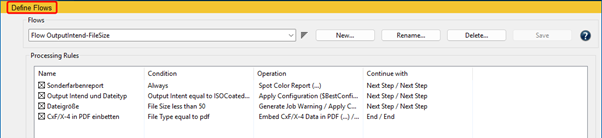
The core of all Flows are the Processing Rules. A processing rule can include one or more Conditions. If a condition is met, a Procedure can be defined, which will then be executed. The next step after that can be defined as well. If a condition is not met, an alternative procedure and an alternative next step can both be defined.
For information about the other new features and improvements in ZePrA 13, please visit: What’s new in ZePrA?